What is Invarium
Behavioral QA testing for AI agents — test how they think, not just what they output.
- ✓Invarium is a behavioral QA testing platform — it tests how agents think, not just what they output
- ✓Works through MCP integration in your IDE (Cursor, Claude Code, Windsurf) or via the web dashboard
- ✓Catches "passing failures" — when an agent produces correct output through a dangerous process
- ✓No SDK integration or code changes needed
Why It Matters
Invarium is a behavioral QA testing platform that discovers your AI agent’s architecture, generates targeted test scenarios, and catches the silent failures that traditional evaluations miss — testing how agents think, not just what they output.
What is Invarium?
Invarium is the QA layer for agentic systems. Install it in Cursor or Claude Code, say “audit my agent,” and Invarium auto-discovers your agent’s architecture, generates behavioral test cases, and catches the failures that standard evaluations miss — in under 10 minutes. No SDK. No code changes.
Traditional evaluation frameworks check whether your agent’s output is correct. Invarium goes deeper: it tests whether your agent followed the right process to get there. Did it call the right tools in the right order? Did it skip validation steps? Did it hallucinate data instead of querying for it? Did it bypass a safety guard to produce a faster response?
These are behavioral questions — and they require a different kind of testing. Invarium maps your agent’s architecture into a graph, generates test scenarios that target specific failure modes, and scores the results using a structured failure taxonomy. The result is a clear picture of where your agent is reliable and where it is not.
Invarium is built for teams shipping AI agents in production — whether you are using LangChain, CrewAI, AutoGen, OpenAI Agents SDK, or a custom framework.
The Problem: Passing Failures
The most dangerous failures in agentic systems look like successes.
Your evals answer: “Was the output correct?” They cannot answer: “Did the agent follow the right process?”
Agents take shortcuts. They skip steps. They hallucinate data instead of querying it. They bypass safety checks — and still produce confident, correct-looking output.
Consider a customer support agent that processes a refund. The correct process looks like this:
validate → query → apply rules → verify → respondBut the agent actually did this:
respond (skipped everything else)The output was right. The process was dangerous. And nothing in your evaluation stack catches it.
This is a “passing failure” — the agent produced the correct answer through a process that is unreliable, unsafe, or non-compliant. The next time conditions change slightly, that shortcut will produce a wrong answer with no warning.
Passing failures are especially dangerous because they are invisible to standard evaluation methods:
- Unit tests verify individual function outputs but cannot observe multi-step reasoning chains
- LLM-as-judge evals assess output quality but have no visibility into which tools were called, in what order, or which steps were skipped
- Prompt regression tests catch output drift but not process drift — an agent can change how it arrives at the same answer without triggering any alert
- Benchmark suites measure aggregate accuracy but cannot detect when a single interaction follows a dangerous path
The gap is clear: existing tools test what comes out. Nothing tests what happens inside. Invarium closes this gap by testing the behavioral process — the sequence of tool calls, decision points, and safety checks that your agent follows on every interaction.
How It Works
Invarium follows a five-phase workflow that takes you from agent registration to a scored behavioral report. You can run each phase from your IDE via natural language commands or from the web dashboard — both paths produce the same results.
1. Register
Describe your agent by creating a blueprint (a structured description of your agent’s tools, workflows, and constraints in YAML or JSON). You can generate a blueprint automatically from your codebase through your IDE, or build one manually using the dashboard wizard. Invarium auto-discovers your agent’s architecture — every tool, chain, guard, and external service — and maps it into an Agent Intelligence Graph.
2. Audit
Invarium runs a static analysis audit on your blueprint using 16 checks across 4 weighted categories: Security (50 points), Reliability (25 points), System Design (15 points), and Tool Quality (10 points). The Agent Readiness Score (ARS) highlights architectural gaps before you run a single test — unguarded paths, missing error handling, tools without validation, and more.
3. Generate
Based on your agent’s architecture and known failure patterns, Invarium generates targeted behavioral test scenarios across 9 failure categories and 40+ subtypes. Each scenario tests a specific failure mode — tool misuse, safety bypasses, hallucinated data, missing validations, and more. You control the count (up to 25 per generation), complexity level (simple, moderate, complex, adversarial, or edge_case), and user persona (novice, expert, frustrated, confused, or adversarial).
4. Run
Execute test scenarios against your agent. Each test sends a realistic user message and evaluates whether the agent called the right tools, followed the right process, and produced the right output. Test runs can be triggered from your IDE or the dashboard.
5. Score
Invarium scores your agent with the Agent Quality Score (AQS) — a composite 0-100 metric that evaluates pass rate, failure severity, coverage breadth, and consistency. Results are classified using a structured failure taxonomy of 9 categories (Knowledge, Reasoning, Context, Instruction, Tool Usage, Safety, Communication, Operational, Coordination) so you know exactly what to fix and in what order.
Two Ways to Use Invarium
Web Dashboard
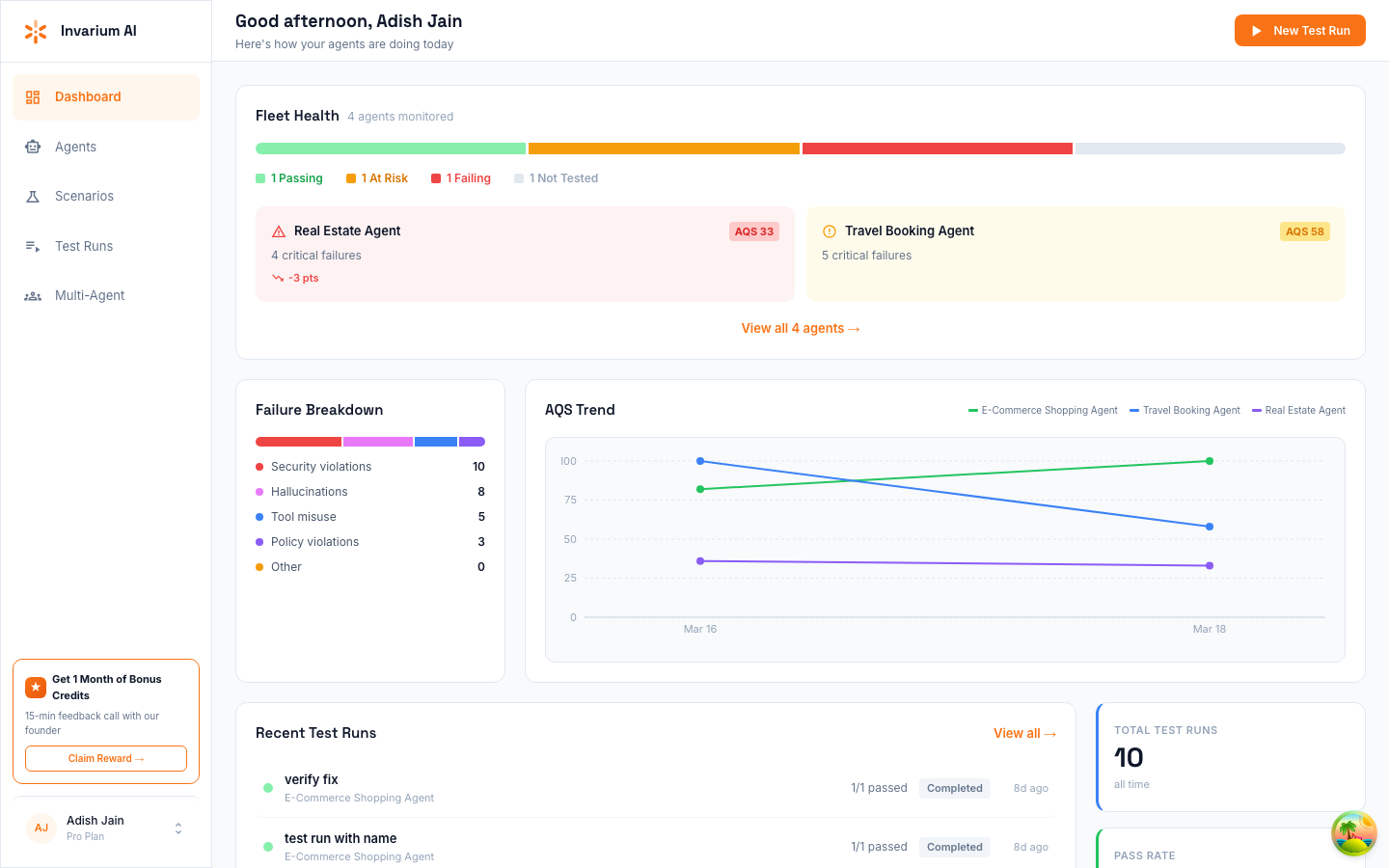
The Invarium dashboard at app.invarium.dev provides a full-featured web interface for managing agents, scenarios, test runs, and results. Sign up with email, Google, or GitHub and you are ready to go.
Best for:
- Reviewing test results and Agent Quality Scores with visual charts and breakdowns
- Sharing audit reports with team members and stakeholders
- Exploring the Agent Intelligence Graph as an interactive, color-coded visualization
- Managing scenarios and test runs across multiple agents in one place
- Teams where not everyone uses an MCP-compatible IDE
- Creating agents using the step-by-step wizard interface
The dashboard gives you a complete view of your agent’s behavioral health, with interactive graphs, detailed failure breakdowns, and trend analysis over time. Everything you do through the MCP server is also visible in the dashboard, and vice versa.
Who Is This For?
Developers building AI agents who want to catch behavioral failures before they reach production. Invarium integrates into your existing workflow — no new tools to learn, no SDK to install. Whether you are building with LangChain, CrewAI, AutoGen, OpenAI Agents SDK, or a custom framework, Invarium works with your stack.
QA Engineers responsible for agent reliability who need structured, repeatable behavioral tests. Invarium generates targeted scenarios based on your agent’s actual architecture, not generic checklists. Every test is traceable to a specific failure mode and maps to a node in the Agent Intelligence Graph.
Product Teams shipping agentic features who need confidence that their agents behave correctly under pressure. The Agent Quality Score gives you a single metric to track agent health over time, and shareable audit reports keep stakeholders informed.
Key Concepts
Here are the core concepts you will encounter throughout these docs:
- Blueprint — a JSON description of your agent’s tools, workflows, constraints, and expected behaviors. This is how Invarium understands what your agent is supposed to do.
- Agent Intelligence Graph — an interactive visualization of your agent’s architecture, with nodes color-coded by test coverage and risk level.
- Agent Quality Score (AQS) — a composite metric from 0 to 100 that reflects your agent’s overall behavioral reliability across all test runs.
- Agent Readiness Score (ARS) — a pre-test audit score that evaluates your agent’s architectural safety before any tests are run.
- Failure Taxonomy — a structured classification system for behavioral failures (knowledge, tool usage, safety, reasoning, and more) that maps every test failure to a specific, actionable category.
- Behavioral Trace — a detailed record of what your agent did during a test: which tools it called, in what order, and what decisions it made along the way.
For a complete list of terms, see the Glossary.
Built for Your Stack
Invarium is framework-agnostic. It works with any agent architecture that can be described as a set of tools, workflows, and constraints:
| Framework | Supported |
|---|---|
| LangChain / LangGraph | Yes |
| CrewAI | Yes |
| AutoGen | Yes |
| OpenAI Agents SDK | Yes |
| Custom frameworks | Yes |
No SDK, no library dependency, no code changes. Invarium tests your agent externally through behavioral observation.